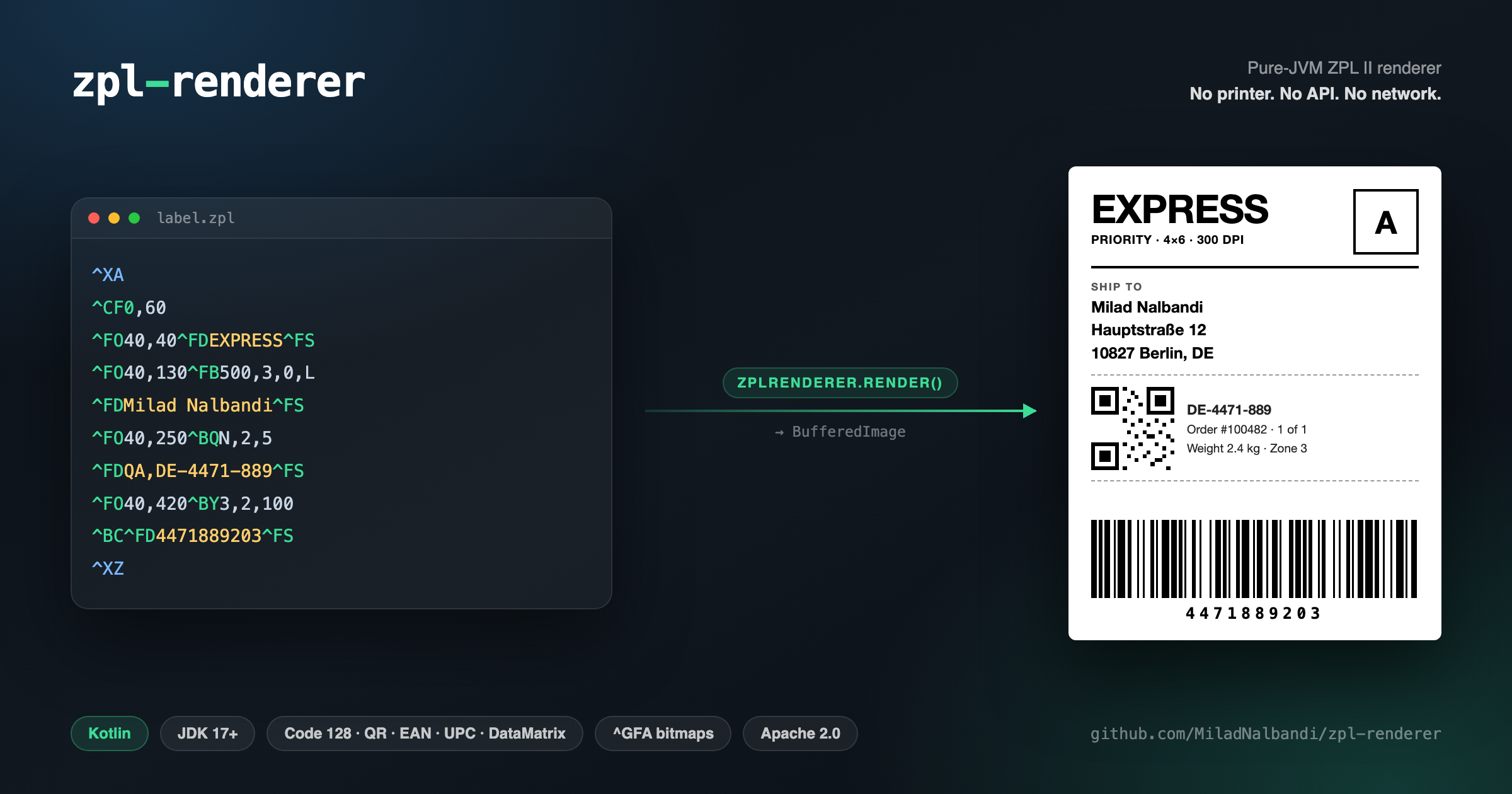
If you've ever written the backend for anything that ships a physical parcel, you've met ZPL — Zebra Programming Language. It's the language thermal label printers speak, and it looks like this:
^XA
^CF0,60
^FO50,50^FDHello, ZPL!^FS
^FO50,150^BY3,2,100^BC^FD123456789^FS
^XZ
That's a 4×6 shipping label: some text, a Code 128 barcode. Your carrier integration spits out a few hundred lines of it per order, and it works — right up until the moment you need to look at one.
Because ZPL has a peculiar property: it is write-only in practice. It's not a document format, it's a stream of printer commands. There is no viewer built into anything. So when a label comes out wrong — barcode clipped, address overflowing its field, logo bitmap mangled — your options have historically been:
- Print it. Walk to the warehouse, print, squint, walk back, change one coordinate, repeat. The feedback loop is measured in minutes and footsteps.
- Send it to Labelary. A genuinely excellent free web API that renders ZPL to PNG. It also means POSTing your labels — with names, addresses, order numbers, tracking codes on them — to a third-party server. Every time. In your test suite too, if you're not careful.
Neither of those is a good answer for a build pipeline. So I wrote a third one.
zpl-renderer
zpl-renderer is a pure-JVM ZPL II renderer. ZPL string in, BufferedImage out. No Zebra hardware, no API call, no native dependency, no network access of any kind.
val image = ZplRenderer.render(zpl, dpi = 300, widthInch = 4.0, heightInch = 6.0)
ImageIO.write(image, "png", File("label.png"))
That's the whole API surface for the common case. There's a Java-friendly overload too — every public method carries @JvmStatic / @JvmOverloads, because a library in this space that's awkward to call from Java is a library half the ecosystem can't use.
BufferedImage image = ZplRenderer.render("^XA^CF0,60^FO50,50^FDHello^FS^XZ", 300, 4.0, 6.0, false, true);
What it actually understands
Not "parses ZPL" in the hand-wave sense — here's the real surface:
- Text —
^FO/^FTpositioning,^Afont and orientation,^CFdefaults,^FBword-wrapped field blocks,^FR/^FIreverse video,^FHhex escapes. - Barcodes — Code 128 (
^BC/^B3), QR (^BQ), EAN-8 (^B8), EAN-13 (^BE), UPC-A (^BU), Data Matrix (^BX), generated through ZXing. - Shapes —
^GBboxes,^GEellipses,^GDdiagonals. - Bitmaps —
^GFA/^GFBgraphic fields, including nibble-based run-length encoding,:Z64:(zlib + Base64) and:B64:. - Templates —
^DF/^XFstore-and-recall with^FNfield numbers, plus~DG/^XGgraphic store, so labels built as a template plus variable data render the way the printer would resolve them. - Structure —
^XA/^XZ,^LHhome offset,^FWdefault orientation,^BYbarcode defaults,^FXcomments.
Output is DPI-aware (200 and 300 dpi, the two that matter), with configurable label dimensions and an in-memory cache keyed on the ZPL plus every render parameter.
The design that made it tractable
ZPL is a long tail. There are hundreds of commands, most of which nobody uses, and a handful that every label depends on. A monolithic parser would have collapsed under its own when block by the third feature request.
So the engine is a chain of responsibility:
ZplRenderer  (public API)
    │
    └─ ZplEngine  (dispatcher)
           ├─ ControlHandler     ^XA ^XZ ^LH ^CF ^FW ^FX …
           ├─ TextHandler        ^FO ^FT ^A ^FB ^FD ^FS ^FR …
           ├─ RectangleHandler   ^GB ^GE ^GD
           ├─ BitmapHandler      ^GFA ^GFB
           └─ BarcodeHandler     ^BY ^BC ^BQ ^B8 ^BE ^BU ^BX
Each handler declares which commands it claims and gets handed the ones it wants. Adding support for a new command means adding a case to one handler, or writing a new handler — never touching the dispatcher.
Two decisions did most of the work:
ZplEngine is an instance, not a singleton. It started life as a global object, which is the obvious thing to write and the wrong thing to have. Making it instantiable means you can construct an engine with custom handlers, and — more importantly — means two concurrent renders can't scribble over each other's state.
All mutable state lives in RenderContext, reset on every ^XA. ZPL is deeply stateful: ^CF changes the default font for everything after it, ^BY sets barcode dimensions for subsequent barcodes, ^LH shifts the origin for the rest of the label. Cramming that into handler fields would make renders order-dependent across calls in a way that's miserable to debug. One context object, created fresh per label, keeps every render hermetic.
The ^GFA decoder deserves a mention as the least glamorous, most satisfying part. Compressed ZPL bitmaps use a nibble-based RLE scheme with repeat characters, line-repeat semantics, and two Base64 container formats layered on top. It's the kind of format you implement by reading the spec and then discovering what real printers actually accept. When a mangled logo suddenly renders correctly, that's the code that fixed it.
Using it
Kotlin 2.0 on the JVM, JDK 17+, Apache 2.0, distributed through JitPack:
repositories { maven("https://jitpack.io") }
dependencies { implementation("com.github.MiladNalbandi:zpl-renderer:v1.1.9") }
The natural fits are the ones I built it for: rendering label previews in an admin panel without a round trip, snapshot-testing your label templates in CI so a coordinate change can't silently break a barcode, and generating PNGs for customer-facing "here's your label" screens without handing addresses to a third party.
It ships in something real
zpl-renderer wasn't written as a library first. It was extracted from ZPL Label Viewer, an IntelliJ plugin that previews labels inside your IDE — separate post on that one. Pulling the engine out into its own repo was the best structural decision in either project: the plugin got smaller and the renderer got a test suite, a changelog, and a life outside a single IDE.
Source, issues and full command reference: github.com/MiladNalbandi/zpl-renderer. If your labels use a command I haven't handled yet, open an issue with the ZPL — that's how most of the current coverage got written.