The debug loop for shipping labels is the worst one I've worked in.
You change a coordinate in a ZPL template. To find out whether it worked, you send the label to a printer — often one that lives in a warehouse, not on your desk — and look at the physical piece of paper that comes out. Barcode too close to the edge? Change a number, print again. Address overflowing its field block on long street names? Print again. Each iteration costs a walk and a label.
The alternative most teams settle on is pasting the ZPL into labelary.com in a browser tab. Faster, and a genuinely good service — but it's still alt-tab, paste, wait, and you've just uploaded a customer's name and address to someone else's server to check a font size.
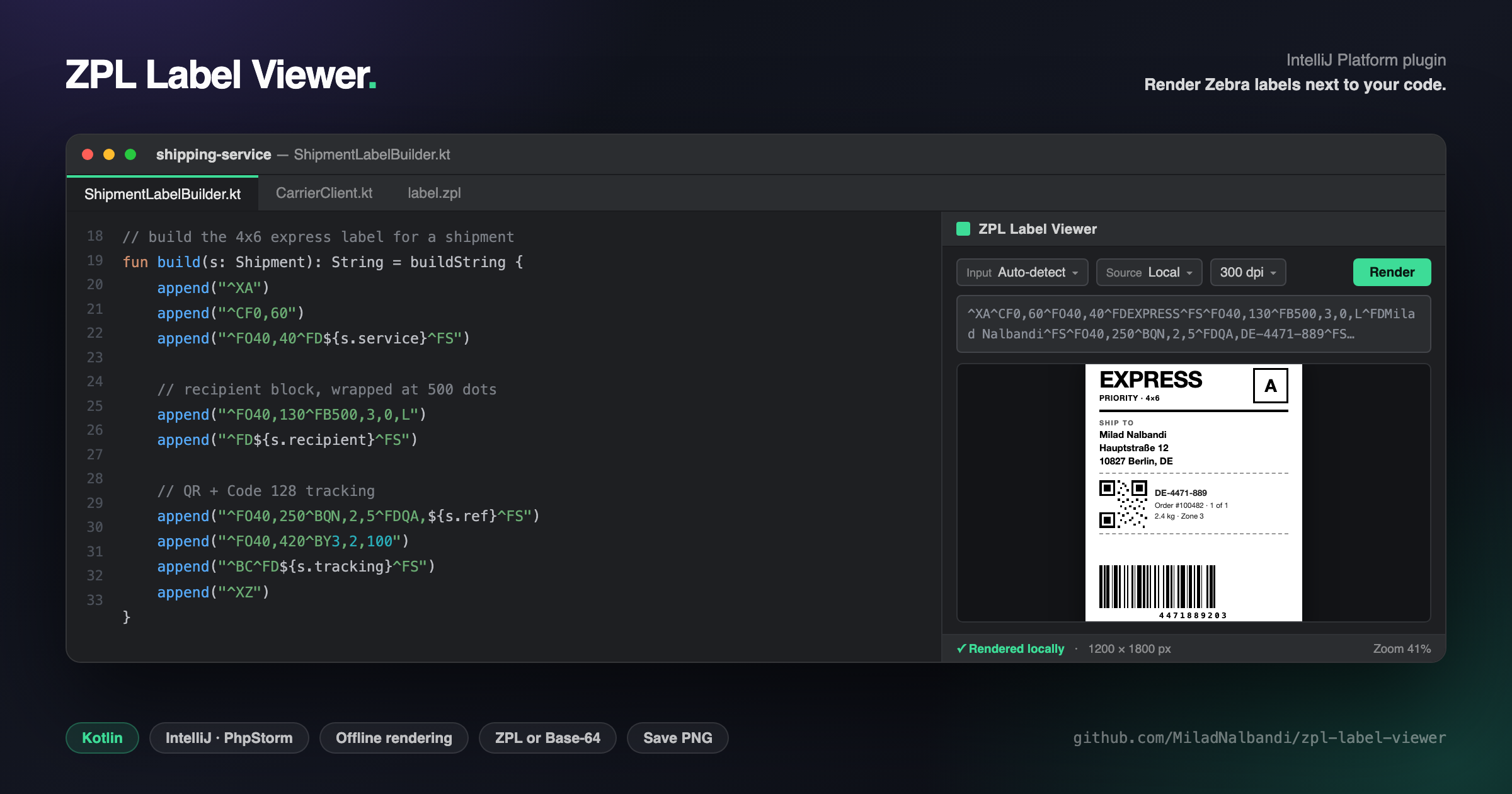
I wanted the label to appear next to the code that generated it. So I built ZPL Label Viewer.
What it is
An IntelliJ Platform plugin — works in IntelliJ IDEA, PhpStorm, and the rest of the JetBrains family. It adds a tool window on the right side of your IDE. Paste ZPL into the input area, hit Render, and the label appears, scaled to fit the panel.
No printer. No browser tab. No network call, unless you explicitly ask for one.
The parts that matter in daily use
Auto-detect input. Real ZPL rarely reaches you as clean text. It arrives Base-64 encoded inside an API response, a log line, or a database column. The plugin sniffs the input and figures out which it's looking at, so you can paste whatever you copied without first deciding what it is. There's a View ZPL action to decode a Base-64 payload and read the actual source when you need to see what the carrier's API really sent.
Local rendering by default. The label is drawn in-process by zpl-renderer, the engine this plugin was built around — text and fonts, word-wrapped field blocks, Code 128, QR, EAN-8/13, UPC-A and Data Matrix barcodes, boxes, ellipses, diagonals, and ^GFA compressed bitmaps. Offline, and your label data never leaves the machine.
Labelary as an opt-in fallback, not a default. A render-source dropdown gives you three modes: Local only, Local → API fallback, and API only. If you hit an exotic command the local engine doesn't handle yet, flip to fallback and keep working; when you're dealing with real customer data, stay on Local only and know nothing is being uploaded. Making that an explicit, visible choice rather than a silent behaviour was the point.
The rest of the loop. 200/300 DPI switching, fit-to-window preview with the zoom level in the status bar, Save PNG to export, and a cache-clear action for when you're iterating on the same label repeatedly. Newer builds also render Base-64 PDF input via PDFBox, which turns out to be how a lot of carrier APIs hand you a label when they aren't handing you ZPL.
Extracting the engine was the best decision
Version 1.0 was a single plugin with rendering logic tangled into the tool window. It worked, and it was a dead end: the renderer couldn't be tested without spinning up an IDE sandbox, and it couldn't be used by anything that wasn't this plugin.
So the engine came out into its own repository. The plugin now looks like this:
ZplToolWindowFactory      ← IntelliJ tool window UI
        │
        ├─ ZplRenderer    ← zpl-renderer library (local rendering)
        │     └─ ZplEngine → ControlHandler, TextHandler,
        │                    RectangleHandler, BitmapHandler, BarcodeHandler
        │
        └─ Labelary API   ← OkHttp fallback
Everything below the first line is a dependency I can version, test, and release independently. The plugin is UI and IDE glue; the renderer is a JVM library anyone can pull into a Spring service or a batch job with no IntelliJ anywhere in sight.
The payoff was immediate and mostly invisible from the outside. The renderer got a JUnit suite, a changelog, and CI that runs in seconds instead of booting a headless IDE. A pile of rendering bugs got fixed as library bugs — ^CF default fonts not applying, ^FR/^FI being misread as rotation instead of reverse video, ^BY reading barcode height from the wrong parameter index, ^GB taking colour and corner-rounding in the wrong order, underscores in field data being eaten as spaces. Each of those is a wrong-looking label that used to cost a trip to the printer to discover. Now each is a test case.
If you're weighing whether to split a plugin's core out into a library: the tell is whether you can write a meaningful test without launching an IDE. If you can't, split it.
Getting it
JDK 17+, Apache 2.0, source at github.com/MiladNalbandi/zpl-label-viewer.
Marketplace publication is still pending, so for now it installs from disk: grab the .zip from Releases, then Settings → Plugins → ⚙ → Install Plugin from Disk… and restart.
Building it yourself is a one-liner:
./gradlew buildPlugin -x buildSearchableOptions
(buildSearchableOptions wants to launch a headless IDE; skip it while you're iterating.) ./gradlew runIde gets you a sandbox IDE with the plugin loaded.
If you work with Zebra labels and something renders wrong, send me the ZPL. Real-world labels are how the renderer's command coverage has grown — every fix in that list above started as a label that looked wrong.