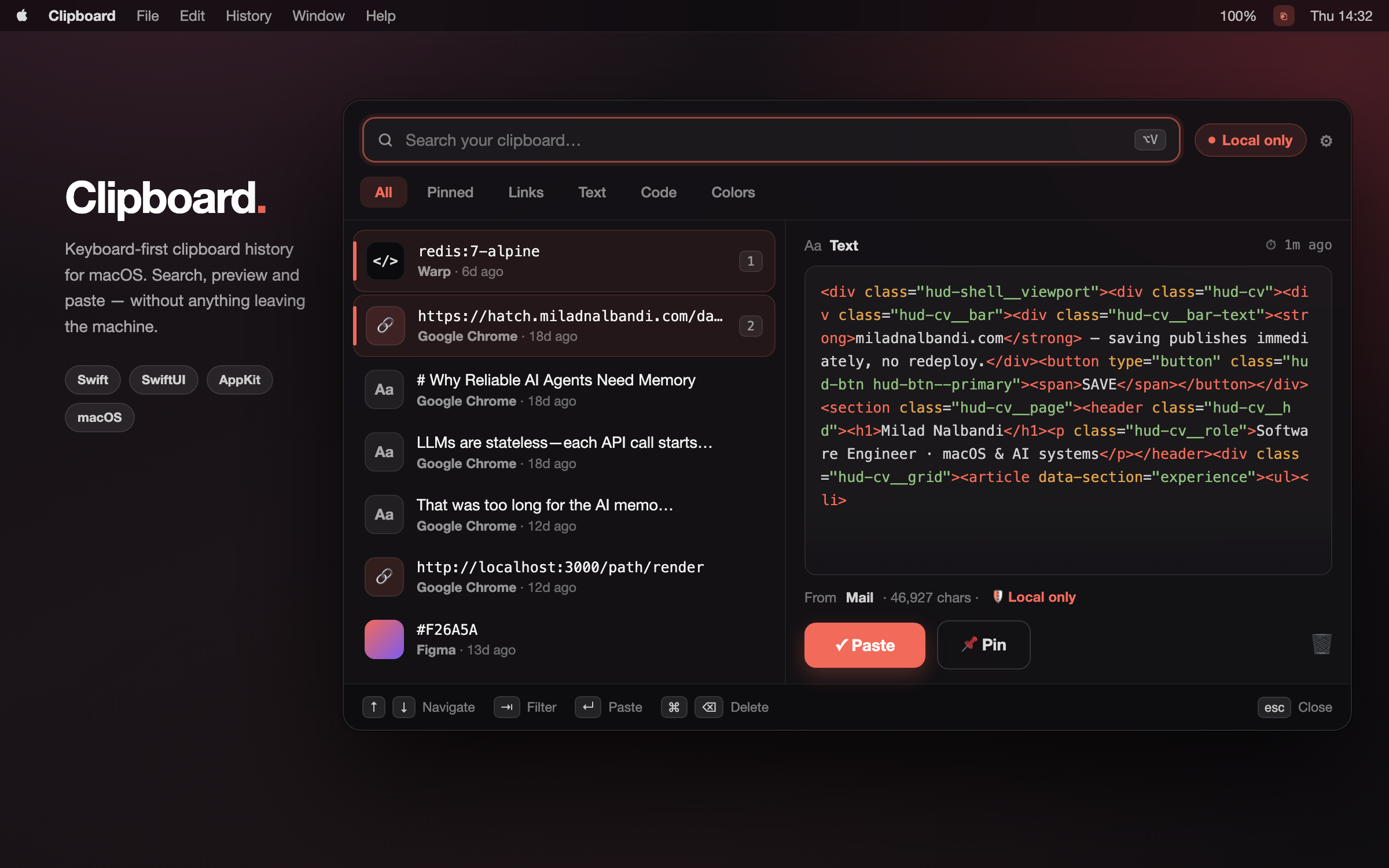
I built a keyboard-first clipboard manager for macOS. It captures everything you copy, skips your passwords, encrypts the rest on disk, and makes exactly zero network requests.
macOS remembers exactly one thing you've copied. Copy a second thing and the first is gone forever — the API endpoint you grabbed thirty seconds ago, the container tag you were about to paste, the paragraph you cut from a doc and meant to move somewhere else.
Every developer works around this the same way: paste it somewhere temporarily. A scratch file, a Slack DM to yourself, the URL bar of a tab you'll never load. This is a bad system, and everyone uses it.
So I built Latch — a clipboard manager for macOS that keeps a searchable history of everything you copy, and keeps every byte of it on your machine.
brew tap miladnalbandi/latch https://github.com/MiladNalbandi/latch
brew install --cask latch
What it feels like
Hit ⌘⇧V anywhere and a frosted panel drops in over whatever you're working in — Spotlight-style, floating, focused. Your history is on the left, a full preview of the selected clip on the right.
Start typing and it fuzzy-searches immediately; there's no click-into-the-field step, because the field already has focus. ↑↓ moves through results, Tab cycles filters, ↩ pastes the highlighted clip back, ⎋ dismisses. If you know the clip is near the top, ⌘1–9 grabs it directly.
The whole interaction is designed around never touching the mouse. A clipboard manager you have to reach for and click through has already cost you more time than scrolling back through your editor would have.
Turn on auto-paste and it goes one step further — the clip lands directly in the app you came from, rather than just sitting on the pasteboard waiting for you to press ⌘V yourself.
It knows what you copied
Every clip gets classified on capture: text, links, code, colors, images, files. That's not decoration — it drives the icon tile, the filter chips, and how the preview renders.
Copy a hex code and the preview shows an actual swatch of the color, not the six characters. Copy from Xcode, Warp or VS Code and it's tagged as code and rendered in monospace. Copy a URL and it's a link, filterable away from the noise of everything else.
The classifier is deliberately boring — precedence order (file → image → color → link → code → text) plus a handful of heuristics: regex for hex and rgba(), single-token-with-a-scheme for URLs, and for code, either a known dev app as the source or punctuation density above a threshold on a multi-line string. No ML, no model to load, no false confidence. Just rules that are easy to read and easy to unit-test.
The password problem
Here's the thing that stops most people from installing a clipboard manager: you copy passwords. A tool that logs everything you copy, forever, is a spectacular liability sitting in your menu bar.
There's an established convention for this that not enough tools honor. Password managers mark their pasteboard writes with hint types under the org.nspasteboard.* namespace — ConcealedType for secrets, TransientType and AutoGeneratedType for content that was never meant to persist.
Latch reads those hints and skips those entries entirely. Not "stores them and hides them from the list" — never captures them at all, so there's nothing to leak, nothing to persist, and nothing to accidentally restore. Transient and auto-generated content is always skipped; concealed content is skipped by default and it's the kind of default that shouldn't be a preference at all.
On top of that: an incognito pause when you want it off for a while, and clear-history-on-lock for shared machines.
No network. At all.
The history file lives at ~/Library/Application Support/Latch/history.dat, encrypted with AES-GCM, with the key in your login Keychain.
But the more important property is the one that's easy to state and hard to walk back: Latch makes no network requests. There's no account to create, no sync, no crash reporting, no analytics, no "anonymous usage statistics" toggle buried in settings that defaults to on. The panel says Local only in the chrome because it's true, and I wanted it visible rather than buried in a privacy policy nobody reads.
Sync is the single most-requested thing for a tool like this, and it's tracked as an issue — but it can only ship as opt-in, off by default, end-to-end encrypted, and with the UI honestly dropping the "Local only" badge the moment it isn't local only. A privacy claim you quietly weaken in a point release isn't a privacy claim.
How it's built
Native Swift + SwiftUI + AppKit. No Electron, no web view, no bundled browser. It's a menu-bar agent that stays out of your Dock and out of your way.
The codebase splits in two, and the split is enforced:
LatchEngine— pasteboard monitoring, classification, the privacy filter, fuzzy matching, encryption, persistence. Pure logic, no UI, fully unit-tested without ever touching a real pasteboard.LatchApp— SwiftUI views, the floating panel, the global hotkey, OS glue.
The engine never imports the app. That one rule is why the interesting parts are testable at all: ClipClassifier.classify(text:types:source:) takes strings and returns an enum, so the whole detection matrix is a table-driven test rather than something you verify by copying things by hand and squinting.
Capture works the way it has to on macOS — there's no pasteboard-changed notification, so you poll NSPasteboard.changeCount. Latch does it on a DispatchSourceTimer on a background queue at a configurable interval, comparing an integer and doing nothing 99% of the time. Cheap, and never on the main thread.
The UI reads its tokens from a central design system rather than hardcoding per view, which is what lets it follow your macOS accent color and light/dark appearance automatically instead of shipping one opinionated theme.
The whole project was built spec-first — fifteen numbered specs in specs/, each with requirements, design, and tasks, written before the code. That sounds like ceremony for a solo project. It wasn't: it's the reason a menu-bar utility has a clean engine/app boundary and real test coverage instead of one 2,000-line view controller that grew organically until it couldn't be changed.
What's next
Open on the tracker right now:
- Syntax highlighting for code clips — the classifier already knows a clip is code; the preview should parse and color it instead of rendering a wall of undifferentiated monospace.
- iCloud sync via your Apple ID — opt-in, end-to-end encrypted, off by default.
Get it
macOS 13+, universal binary (Apple Silicon + Intel), GPLv3, source on GitHub.
brew tap miladnalbandi/latch https://github.com/MiladNalbandi/latch
brew install --cask latch
Or grab the DMG from the releases page. The build is unsigned, so the first launch needs a right-click → Open.
If you find something broken, open an issue. I read all of them.