Why I Built It
You're one person with an idea. You don't have a PM, a designer, a frontend engineer, a backend engineer, a QA, and a growth lead. For years, I felt this gap acutely—bouncing between roles, making compromises, shipping half-baked ideas because I lacked domain depth in every direction.
Then Claude arrived. And I realized: what if I could spin up an entire organization of AI agents, each deeply trained on their role, who could sit down and build something real in my workspace? Not wireframes or ideation docs, but actual code, designs, and strategies that I could inspect, edit, and ship?
Founder's Cockpit is that idea realized. It's a Claude Desktop–style application that orchestrates an "org" of AI agents—CEO, Product Strategist, Designer, Engineer, Marketing, Engagement, Analytics, Release, and an always-on Buddy advisor—all working inside your project. You paste your idea, hit run, and watch them go to work. Every artifact lands in your workspace. Everything is sandboxed, inspectable, and yours to ship.
What the Agents Do
Each agent has a clear mandate and a tool allowlist:
• CEO / Orchestrator: Routes the next action across the org. Decides whether the Product Strategist should write the PRD next, or the Designer should start mockups, or the Engineer should scaffold the stack.
• Product Strategist: Writes docs/PRD.md—a concrete product requirements document with MVP scope, success metrics, and a day-by-day build plan.
• UI/UX Designer: Generates design/mockup.html—a clickable, responsive Tailwind mockup of 3 key screens with rationale for typography, color, and motion.
• Full-Stack Engineer: Scaffolds apps/web, apps/api, and apps/mobile—real project structures with root README, Docker configs, and starter code.
• Buddy Advisor: An always-on streaming chat. At any moment, you can ask the Buddy for the next step, feedback on what's been built, or tactical advice. It synthesizes what the org has done and recommends what comes next.
Marketing, Engagement, Analytics, and Release leads are stubbed in—ready to be filled in as the product evolves. Each agent only reads/writes files in the project's sandboxed workspace and has a 60-second execution timeout with a strict command allowlist.
Architecture in One Breath
The Cockpit is a Django REST + WebSocket backend paired with an Electron + React desktop client.
Backend: Django 5, DRF, Channels (WebSocket), Celery (task queue), Postgres (prod) or SQLite (dev). Agents run via the Anthropic SDK with tool use. Each user gets a sandboxed workspace at backend/workspaces/{user_id}/{project_id}/ where agents read/write files. Filesystem operations and shell commands are validated against an allowlist—no directory traversal, no dangerous commands. Anthropic API keys are encrypted at rest with Fernet, and in production the server refuses to start unless FERNET_KEY and DJANGO_SECRET_KEY are explicitly set.
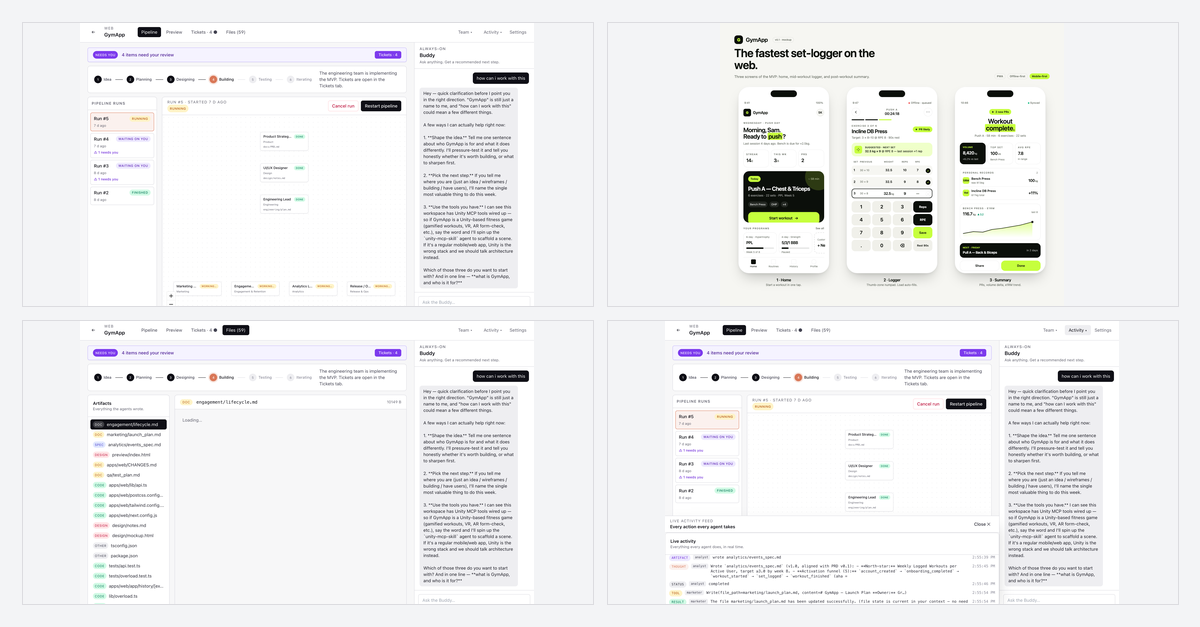
Frontend: Electron main + preload running a React SPA built with Vite. Zustands stores hold auth, project state, and WebSocket subscriptions. The Cockpit view layers four tabs—Workflow (kanban of agent tasks), Preview (live HTML rendering), Activity (streaming log of thoughts, tool calls, artifacts), and Files (browse and preview written artifacts). The Buddy panel lives on the right rail, always open, streaming token by token as you chat.
IPC: REST for mutation (create project, run agent), WebSocket/Channels for real-time updates (agent heartbeats, streaming thoughts, file writes).
The Pipeline View
 → Designing (Mockups) → Building (Code) → Testing (Tickets) → Iterating (Polish).
Click Run on any card, and that agent springs to life. You see its thoughts stream in the Activity feed in real-time. Files appear in the Files panel as it writes them. If it hits an error or needs clarification, you can hop into the Buddy chat and course-correct. The entire org's progress is visible at a glance—no hidden queues, no black-box APIs returning JSON hours later.)
Watching It Build a Real App: GymApp
I tested Founder's Cockpit by giving it a single paragraph: "A mobile app for gym-goers to log workouts, track progress, and share achievements with friends."
The org took it and ran. In about 20 minutes:
• Product Strategist wrote a full PRD with user personas, feature breakdown, and a 4-week build plan. • Designer created a 3-screen mockup (Onboarding, Workout Logging, Progress Feed) with a consistent color palette and Tailwind styling. • Engineer scaffolded a full-stack project: Next.js frontend, Python FastAPI backend, mobile setup—all structured, all ready to run.
Every file was written by Claude, from one paragraph of input. The entire org worked in parallel, each agent feeding off the PRD, the mockups informing the API contract, the API structure informing the mobile layout. You can see the GymApp example at https://miladnalbandi.github.io/founders-cockpit/examples/gymapp/ — click the interactive preview, poke at the design rationale, read the PRD.
This is what Founder's Cockpit makes possible: a studio, not a typewriter. An organization that can turn ideas into artifacts in minutes.
Three Lessons from Building It
Building Founder's Cockpit taught me three things that I think matter:
1. Tool allowlists are non-negotiable. Each agent gets a precise, minimal set of tools: read file, write file, list directory, git, shell (whitelist only: python, npm, node, git, etc.). No arbitrary exec, no network access. This constraint is actually liberating—it forces clarity on what the agent needs to do and makes the sandbox bulletproof.
2. Secret management should fail loud in production. Hardcoding API keys, even "for dev," is a trap. Founder's Cockpit auto-generates and persists Fernet keys in dev (for convenience), but in production it refuses to start unless FERNET_KEY and DJANGO_SECRET_KEY are explicitly set. Users' Anthropic keys are encrypted at rest. This pattern has prevented leaks and confused deployments.
3. Showing is better than telling. The Activity feed logs every thought, every tool call, every file written. The Buddy doesn't hide reasoning; it streams it. When things go wrong, you see why. When agents collaborate, you see the handoff. This transparency builds confidence in an AI-driven system in a way no amount of polish can.
These lessons apply beyond Founder's Cockpit—they're principles for any system that delegates work to AI.
What's Next and How to Contribute
Founder's Cockpit is open-source under GPL-3.0. The repo is at https://github.com/MiladNalbandi/founders-cockpit, and there's a full tutorial at https://miladnalbandi.github.io/founders-cockpit/.
Phase 2 includes real App Store / Play Console publishing (Release agent), ad platform integrations (Marketing), and push notification delivery (Engagement). But the Cockpit itself will help us build these features—a beautiful recursion.
If you're a founder, a designer, an engineer, or just curious about what an AI-powered organization looks like, try it. Spin up a project with your idea, watch the agents work, and ship what they build. Or fork the repo, customize the agents, add tools, and build toward your own vision.
Contributions are welcome. Issues, PRs, questions—bring them to GitHub. The goal is to make this as useful and as safe as possible.
Links & Next Steps
• GitHub Repo: https://github.com/MiladNalbandi/founders-cockpit • GitHub Pages Tutorial: https://miladnalbandi.github.io/founders-cockpit/ • Live Example (GymApp): https://miladnalbandi.github.io/founders-cockpit/examples/gymapp/ • License: GPL-3.0 (free to use, modify, and distribute)
Start here: clone the repo, follow the "Running locally" section, paste your Anthropic API key, create your first project, and hit run. In a few minutes, you'll have a PRD, mockups, and scaffolded code—all written by your new AI org.
Welcome to the Cockpit. ✈️